

Last Updated on February 13, 2026 by Jim Benson
-
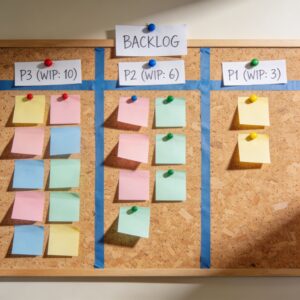
A priority filter, which helps you quickly prioritize work without a lot of planning.
The Priority Filter: How to Decide What Actually Deserves Your Attention
Your backlog has a ton of items. You can do three today. How do you choose?
It another morning. You sit down to work and your board is staring back at you…a wall of sticky notes, a screen of cards, a list that grew overnight while you were sleeping. Everything on it is something you said yes to. Everything feels like it is urgent, a priority. And the question that ends your day before it starts is “how do I choose when everything seems urgent?”
This is the moment most productivity systems quietly fail you. They’re excellent at capturing work. They’re terrible at helping you decide.
Personal Kanban’s answer is the Priority Filter: a design pattern that turns the overwhelming act of prioritization into something visual, real-time, and almost effortless. Not “whatever’s screaming loudest.” Not a one-time ranking exercise you forget by Tuesday. A living filter built right into your board.
Why Prioritization Breaks Down
Let’s be honest about what’s happening when you stare at a full backlog and freeze.
It’s not that you’re lazy. It’s not that you lack discipline. It’s that prioritization is often more difficult and daunting than the tasks themselves. The cognitive load of comparing forty items, each with different urgency, importance, effort, and emotional weight, overwhelms your ability to choose. So you default. You pick whatever’s easiest, or whatever’s most recent, or whatever someone just asked you about. None of which is the same as what’s most important.
This is what we call existential overhead — the price you pay for having too much to do. It’s not the work itself that exhausts you. It’s the weight of unprocessed, undifferentiated commitments sitting in a pile, each one quietly demanding attention. Your brain treats every open item as an unresolved problem, and the pile becomes a tax on every decision you make, including decisions that have nothing to do with the pile.
The Priority Filter breaks this cycle — not by asking you to rank forty things, but by giving you a physical structure that separates what matters from what doesn’t, in real time, at a glance.
What the Priority Filter Actually Is
The Priority Filter isn’t a checklist you run before pulling work. It’s a three-stage funnel built into your backlog that continuously sorts work by relative importance — so when it’s time to pull, the decision is already made.
Here’s how it works. Instead of one flat backlog column, you split your backlog into three priority columns:
P3 (WIP: 10) → P2 (WIP: 6) → P1 (WIP: 3)
![Priority Filter board showing three backlog columns: P3 with WIP limit of 10, P2 with WIP limit of 6, and P1 with WIP limit of 3]
Everything enters at P3 — the widest part of the funnel. This is your holding pen. Ten items maximum. These are things you’ve committed to or that have landed on your radar, but they haven’t been evaluated yet. They exist. That’s all you know.
As you review and reflect, items that matter get promoted to P2. Six slots. Now you’re making a judgment: this is more important than some of the things in P3. Not all of them need to move. Most won’t. P2 is the “this is real and it matters” zone.
From P2, the highest-priority items get promoted to P1. Three slots. These are the items that are ready, important, and next. When you finish something in your Doing column, you pull from P1. No deliberation needed — the filter already did the work.
The WIP limits on each column are what make this a filter and not just a ranking system. You can’t promote everything. Ten slots, then six, then three. The narrowing forces you to make real choices — but small ones, a few items at a time, instead of one impossible comparison of forty things at once.
The Magic: Real-Time Reprioritization
Here’s what makes the Priority Filter different from every other prioritization method: it runs continuously, not once.
Traditional prioritization happens at a fixed point — you sit down on Monday morning, rank your list, and work the plan. By Wednesday, the plan is fiction. New things arrived. Old things changed. The ranking you sweated over is irrelevant.
The Priority Filter is designed for the world you actually live in. Because the three columns are always visible on your board, reprioritization happens in real time:
- A new urgent request arrives? Add it to P3. If it’s truly important, promote it to P2 or even P1 right now — but only if you demote something else back. The WIP limits enforce the trade-off.
- Something in P1 gets blocked? Slide it back to P2 and promote something else. No drama. No replanning session. Just move the cards.
- Realize something in P2 doesn’t actually matter anymore? Move it back to P3, or pull it off the board entirely. You just freed a slot for something that does matter.
The board is always current. You’re never working from a stale plan. And because the columns have WIP limits, every promotion is also a demotion — which means you’re always making relative comparisons, not absolute rankings. “Is this more important than that?” is a question you can answer. “Rank these forty items” is a question that breaks your brain.
You can also always pull directly from any column. If something in P3 suddenly becomes critical — pull it straight into Doing. The filter is a guide, not a prison. The structure serves you; you don’t serve the structure.
Why Three Stages?
Three isn’t arbitrary. It maps to how your brain actually processes importance:
P3 is recognition. “This exists and I might need to deal with it.” Low cognitive cost. You’re just acknowledging.
P2 is evaluation. “This matters more than some other things.” Medium cognitive cost. You’re comparing, but only within a small set.
P1 is commitment. “This is what I’m doing next.” The decision is already made. When you have capacity, you pull. Zero cognitive cost at the moment of action.
This three-stage progression is why the filter calms the complexity that makes prioritization painful. You never compare forty items. You compare ten to pick six. Then six to pick three. Then three to pick one. Each comparison is manageable. The sequence of manageable comparisons produces a clear priority without you ever having to hold the whole backlog in your head.
Layering the Filter: Adding Dimensions
The three-column structure is the foundation. As your practice matures, you can add dimensions to make promotions smarter.
Urgency vs. Importance
When deciding what moves from P3 to P2, you can overlay the urgent/important matrix. Urgent things feel like they belong in P1. But do they? If something is urgent but not important, it might stay in P2 — or get delegated, or get dropped. The filter forces you to untangle the two before committing a P1 slot.
If every card in P1 is urgent, your filter is telling you something: you’re living in crisis mode. Visualizing that imbalance is the first step toward changing it.
Value Stream Awareness
Not all tasks serve the same purpose. Some are maintenance, some are growth, some are investment. Mapping your value stream lets you check: am I promoting a healthy mix, or is P1 always full of reactive work while the strategic work rots in P3?
Context and Energy
The most sophisticated filter accounts for you — not just the work. Before promoting to P1, ask: does this match the energy and context I’ll have? This is where pulling in batches — curating a “Today” set each morning from P1 — becomes powerful. You’re not just filtering by importance but by what makes sense together given your day.
The Filter in Crisis: When Everything Is Urgent
The Priority Filter gets its hardest test when everything genuinely is urgent. Your backlog explodes. Deadlines collide. The crisis is real, not manufactured.
This is exactly when the filter matters most.
When managing the aftermath of Hurricane Sandy, one of the things that became clear was that crisis doesn’t suspend the need for prioritization — it intensifies it. When resources are scarce and stakes are high, pulling the wrong work first has real consequences. In crisis mode, the P3→P2→P1 promotion criteria shift:
- P1: What prevents harm right now? (Safety and stabilization)
- P2: What unblocks the most other work? (Dependencies and bottlenecks)
- P3: Everything else. (Important, but not yet)
The WIP limits become even more critical in crisis. The temptation is to blow past them — everything feels like P1. But a P1 with fifteen items is just a flat backlog again. The constraint is what creates clarity. Three items. That’s what you can actually do next.
Why the Filter Works: The Psychology
The Priority Filter works because it does something counterintuitive: it makes prioritization physical and continuous instead of mental and episodic.
When you face a backlog of forty items, your brain tries to hold all forty in working memory, compare them simultaneously, and produce a rank ordering. That’s computationally impossible for a human mind. You choke.
The three-column filter externalizes that comparison onto your board. You can see the relative importance of things without having to hold it all in your head. P1 items are physically closer to your Doing column. P3 items are physically further away. The spatial arrangement is the prioritization — and it’s always there, always current, always visible.
This connects directly to why limiting WIP calms complexity. The filter’s WIP limits (10 → 6 → 3) and your Doing column’s WIP limit work as a unified system. The filter reduces the selection set. The Doing limit reduces the execution set. Together, they keep your cognitive load within the range where good decisions happen naturally.
And there’s a motivational dimension too. When you promote a card to P1, you’re making a conscious choice — not reacting to pressure. That sense of agency changes how the work feels. Tangible tasks that you’ve deliberately selected produce their own form of prioritization — the act of choosing makes the chosen work feel more meaningful and more doable.
Maintaining Your Filter: The Feedback Loop
A Priority Filter isn’t something you set once and forget. It’s a living part of your practice that you refine through reflection.
The Done column review is where your filter gets smarter. At the end of each day or week, look at what you actually completed and ask:
- Did I pull the right things from P1? Were those genuinely the most important items, or did I default to comfortable work?
- Did anything languish in P3 that should have been promoted? If something sat in P3 and turned into a crisis, your promotion instincts need recalibrating.
- Did anything I completed turn out to be unnecessary? If P1 items didn’t matter, junk is leaking through your filter.
- Are items flowing through the columns or getting stuck? A P2 that never changes suggests you’re not reviewing often enough.
This retrospective practice is what turns the Priority Filter from a static layout into an evolving instrument tuned to your specific work patterns. Over time, you develop an instinct for what gets promoted and what doesn’t — but the instinct is trained, not guessed.
As we explored in learning from completion, the Done column isn’t just a trophy case. It’s data. Every completed card tells you something about whether your filter is working.
Common Mistakes with the Priority Filter
Treating P1 as “urgent” and P3 as “not urgent.” The columns are about relative priority, not urgency. A deeply important strategic task belongs in P1 even if no one is yelling about it.
Blowing past the WIP limits. If your P1 has nine items in it, you don’t have a priority filter — you have three backlogs. The limits are the mechanism. Respect them.
Never demoting. Cards should move in both directions. Something that was P1 last week might be P3 this week. If cards only flow one direction, you’re accumulating, not filtering.
Filtering without reviewing. The filter runs continuously, but it still needs a periodic tune-up. Clean up and categorize your backlog regularly. Remove dead items. Demote stale ones. Keep the columns honest.
Ignoring emotional weight. Some tasks are small and “important” but carry enormous emotional resistance — a difficult phone call, a conversation you’re avoiding. A good filter accounts for the fact that some work costs more cognitive energy than its size suggests.
Your Priority Filter Starter Kit
Here’s how to set up a Priority Filter today:
Step 1: Take your flat backlog and split it into three columns: P3, P2, P1. Label them with WIP limits. Start with 10 / 6 / 3 — you can adjust later.
Step 2: Move everything currently in your backlog into P3. If P3 overflows its WIP limit, good — that’s already telling you something. Trim.
Step 3: Review P3 and promote the items that are ready and important to P2. Don’t agonize. First instincts are usually right here. If you can’t decide between two items, pick either — you can always swap later.
Step 4: From P2, promote the items you’d work on next if you had capacity to P1. Three items. That’s it.
Step 5: When you finish something in Doing, pull from P1. When P1 has an opening, promote from P2. When P2 has an opening, promote from P3.
Step 6: When something new arrives, it enters at P3. If it’s genuinely more important than what’s in P1, promote it — but demote something else to make room.
Step 7: At the end of each day, glance at all three columns. Does the layout still reflect reality? If not, shuffle. This takes seconds, not minutes.
The filter is always running. Every glance at your board is a micro-prioritization. Every promotion is a small, easy decision. And by the time something reaches P1, the hard choice has already been made — in pieces, over time, without drama.
The priority filter doesn’t make hard choices easy. It makes hard choices unnecessary — by breaking one impossible decision into a stream of small, obvious ones.
The Priority Filter is a core design pattern in Personal Kanban, created by Jim Benson and Tonianne DeMaria Barry. Watch the original video below and explore the full archive of design patterns at personalkanban.com. For new content every week, see our substack at humanework.substack.com
Further reading from the Personal Kanban archive:



Hi there and thanks for the presentation. Definitely something to think about.I use Omnifocus for backlogs and roughly what I want to accomplish today. When the day starts I write the actions i expect to get done on a pomodoro todo sheet and estimate.I like the idea of WIP, but haven’t found a way to integrate that into my OmniFocus setup.Do you have any thoughts or suggestions?
Great question!I have a working session with someone who is a heavy Omnifocus user on Monday, I will bring this up and see what we come up with.
Thanks, interested in hearing more.I’ve just emailed the OmniGroup and asked them if OmniFocus has an API that would allow my to construct my own view. Something like this : http://bit.ly/d2r5U3I'll comment here when I get a reply.-A
I use OmniFocus pretty heavily, and until Personal Kanban, I was a heavy GTD believer. I still like and use a lot of what’s in GTD, but OmniFocus no longer gives me what I want.I haven’t found any way to either enforce WIP (or even show WIP) or to model lanes in OmniFocus.At this point I’m using it as fairly decent backlog management tool. I do subscribe to trying to get everything OUT of my head. So OmniFocus is a good place to dump and process it. Then once a week I pour as much as I want (and as will fit) from OmniFocus to AgileZen. Then I wish I had an iPhone app.
FYIOmniFocus does not have an API, but I managed to hack something together using the OmniFocus applescript dictionary and Appscript. http://flic.kr/p/7HffMqMy definitions : backlog = uncompleted tasks with no due date or due date in the future | WIP = uncompleted tasks with due date <= today.Sorry about being off topic here. I realize this has little todo with the priority filter :)-A
I just had a thought, if you stop using contexts the way GTD wants you to, then you can use them as lanes. I just replaced all my GTD contexts with these 5 :Lo (8)Medium (6)Hi (4)Doing (2)Holding (15)Obviously, omnifocus won’t keep track of WIP limits, but I can do that manually. The win, at least in theory, is that I get omnifocus keeping track of my backlog (in the project view), and I have personal kanban built on top of it (in the context view). The backlog is anything that does not have a context.Oh, and there’s no “done” column, there doesn’t need to be, just check it off when it’s done.I just made this change today, so we’ll see how it goes.
So, a couple months later here’s what I have to report.It’s great. Omnifocus is a great project planning tool with excellent cross machine syncing, so that I can do stuff on my laptop and sync it to my phone transparently.If you already have Omnifocus and like it, but want to try Personal Kanban, I say go for it!In the last couple weeks, however, I have stopped using Omnifocus in favor of iKan for the iPhone. iKan is a tool that Gary Bernhardt, Jim Benson, Corey Ladas & I wrote. In the interest of eating our own dogfood, I’ve been using it instead of Omnifocus. There are good things and bad about iKan.Good :- it’s small and fast- it knows about wip limits and does sensible color things about them- it supports drag and dropBad :- no desktop client like omnifocus- no web client (though we do support import from agile zen)We are planning on doing a release before too long to support integration with different web services. We are thinking about Remember the Milk or Lean Kit Kanban.
Hi Jeremy,Thanks for sharing about your experiments.So have you stopped using OmniFocus altogether? What’s your latest experience with iKan?
[…] 1: The Priority Filter makes important work the default […]